Now available for macOS

The vlog editor
that edits for you

Drop raw clips into a native Mac app. AI finds the good moments, cuts the rest, writes the narration — and says it in your own voice. You review. It ships.

Free trial with every feature · macOS 15+ · Notarized by Apple

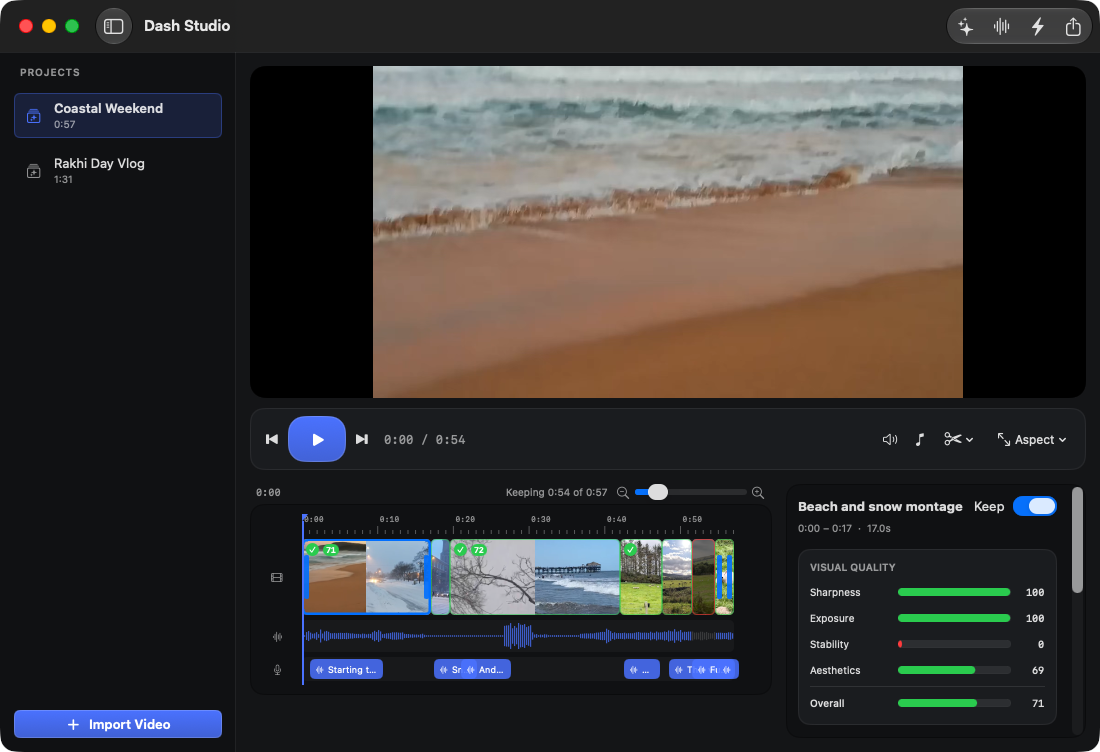
Dash Studio editing a travel vlog: multi-track timeline with AI keep/drop decisions, waveform, narration track, and per-scene quality scores
The workflow

You film. It edits.
You approve.

Every AI decision lands on a real editing timeline — visible, reversible, and yours to overrule. This is an editor, not a slot machine.

01 — UNDERSTAND

It watches your footage so you don't have to

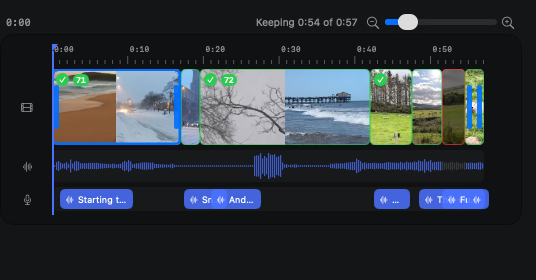
Scene detection and quality scoring run on-device. Then Claude looks at each scene and decides what stays — with a written reason for every cut.

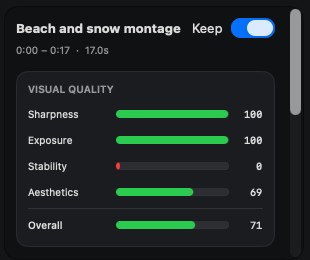
  • Sharpness, exposure, stability & aesthetics scored per scene
  • Blurry, boring and duplicate shots pre-trimmed
  • Multiple clips merged in shooting order automatically
Per-scene visual quality scores: sharpness, exposure, stability, aesthetics
02 — NARRATE

Narration written by AI, spoken by you

First-person narration is written for each scene and generated in your cloned voice — record one minute once, and every vlog after that narrates itself. Original audio ducks under it automatically.

  • Edit any line, regenerate in a click
  • Voice isolation + speech EQ for crystal-clear audio
  • Volume boost up to 200%, soft-limited so it never clips
Multi-track timeline with narration clips and audio waveform
03 — DIRECT

Notes from an editor who actually watched it

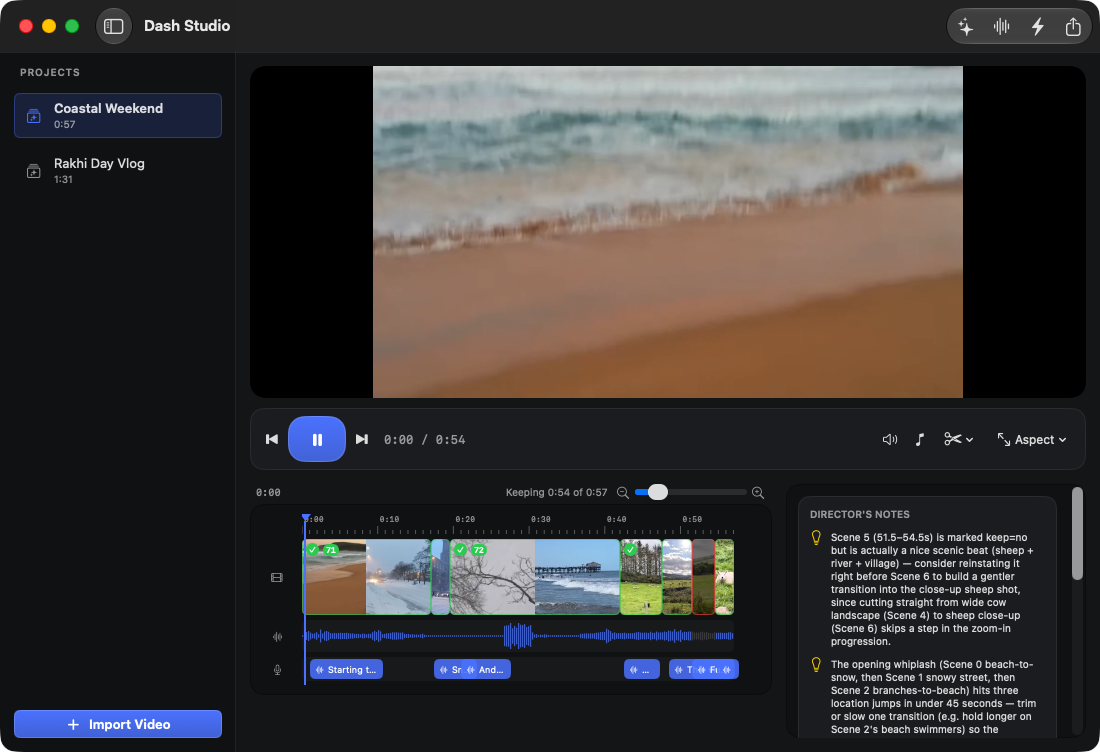
Every project comes back with Director's Notes: what to reorder, what drags, which shot you forgot to film. Feedback you can act on before you publish.

  • Pacing and repetition called out per scene
  • Reorder suggestions with timestamps
  • Missing-shot list for your next filming session
Director's Notes: AI editorial suggestions about pacing, ordering and missing shots
And everything around it

Small app. Full kit.

One-click Shorts

AI picks your best 30 seconds and exports a 9:16 vertical Short — cuts, music and clean audio included.

Mood-matched music

Point it at your music folder and AI picks the track that fits the vlog — auto-ducked under speech.

Every aspect ratio

16:9 for YouTube, 9:16 for Reels, 1:1 and 4:5 for feeds — smart crop-fill, live in the preview.

Real editing controls

Trim handles, keep/drop toggles, transitions, scrubbing, waveforms — a real NLE under the automation.

Private by design

Analysis, audio cleanup and export run on-device. Your footage never uploads — only tiny keyframes reach the AI.

Bring your own keys

Runs on your Anthropic + ElevenLabs accounts. A 10-minute vlog costs about $0.25 to analyze. No subscription to us.

Demo

Twenty-two seconds of it working

Pricing

Pay once. Vlog forever.

Free trial
$0
  • Every feature unlocked
  • Unlimited projects
  • Small watermark on exports
Download for Mac

Dash Studio runs on your own Anthropic and ElevenLabs API keys, stored in the macOS Keychain. You see and control exactly what the AI costs — typically pennies per vlog.

FAQ

Questions, answered.

Does my footage leave my Mac?

No. Scene detection, quality scoring, audio cleanup, merging and export all run on-device. Only a few small keyframes per scene are sent to Claude for scene understanding, and narration text goes to ElevenLabs for speech. Your video files never upload anywhere.

How does the voice cloning work?

Record a one-minute sample in the app — with explicit consent — and Dash Studio creates a clone through your ElevenLabs account. Or pick any voice already on it. Narration audio is cached, so you only pay for lines you change.

What do I need to run it?

A Mac on macOS 15 or later, plus free-to-create Anthropic and ElevenLabs API keys. Keys are stored in the macOS Keychain, and the app is notarized by Apple.

What formats does it handle?

Anything AVFoundation reads — iPhone HEVC, H.264, MOV, MP4. Mixed orientations and resolutions are normalized automatically when clips merge, and exports go out as MP4 in 16:9, 9:16, 1:1 or 4:5.

Is there a refund policy?

Try the free trial first — it's the full product. If you buy and it's not for you, email us within 14 days and we'll refund you, no questions asked.

Your camera roll is full
of unfinished vlogs.

Finish them this weekend.